
Approve what your agents ask to do
Approve or deny what an agent asked to do before acting, from its autonomy settings, triggers set to Propose only and Qoren tools, before it expires.
On this page
- Where requests come from
- Choose when an agent asks first
- See what is waiting
- Requests from connected tools
- Approve or deny a request
- What keeps an approval honest
- When an agent proposes several actions at once
- Decide from the agent's page
- Review past decisions
- Get told when something is waiting
- Frequently asked questions
Some things an agent does wait for you first. A trigger set to Propose only writes down what it would do, an agent whose autonomy says to ask first stops before anything that changes state, and the Qoren tools that can do lasting damage always ask. All of those land in one place, the Approvals page, where an org owner approves or denies them. A request nobody decides expires after 24 hours, so it pays to know where to look.
Where requests come from#
| Label on the request | What asked |
|---|---|
| Trigger: name | A webhook trigger set to Propose only, or any trigger or email on an agent set to ask first on Triggers and email. The label names the trigger. |
| Chat | An agent set to ask first on your messages, or on a teammate's, proposed a command or an outbound action instead of running it. Its follow ups after your decision carry the same label as the turn that started them. |
| Platform tool | An agent called a Qoren tool that waits for a person: one tagged Asks for approval, such as resizing an environment or removing an agent, or one its Qoren actions rows set to Ask first. See agent permissions. Calls to connected tools, such as marking a Pipedrive deal won, and triggers an agent asks for (Let the agent add a trigger) carry this label too. |
| Self-repair | An agent set to ask first on Self-repair, fixing a recent error on its own, proposed a change. |
| Scheduled | A scheduled task Qoren ran for an agent set to ask first on Scheduled tasks. |
Choose when an agent asks first#
Each agent has an Autonomy setting, in its Settings tab under Permissions. While an agent asks first, it can still read, search and think on its own, but before it runs a command with side effects, sends an email, posts a message or calls an outside service, it stops and proposes the action here instead.
- Autonomous acts on all of its work without asking.
- Balanced, where every new agent starts, acts on your messages and asks first on work from triggers, email, teammates, schedules and self-repair, and before it spends money, schedules itself or shares a public link.
- Cautious asks first on everything.
Under Customize you can set each source of work and each kind of Qoren action on its own, and choose to approve automatically everything the agent proposes except high risk. A change applies from the agent's next turn; nothing restarts. While the agent asks first on your messages, its Chat tab says so under the message box. Every row, who may change it, and what it does not cover yet are in agent permissions.
Some actions always ask, whatever the autonomy: destroying, resizing or moving environments and agents, rebuilding an agent from its template, deleting leads or proposals, archiving clients, and the connected tool actions tagged Always asks, such as refunds and closing a deal (see actions that always ask). Messages that reach an agent through a chat app, and tasks marked Runs in the agent, are not covered by the sources of work yet and run without asking, though the agent's Qoren tool calls still follow its Qoren actions rows.
From the terminal, qoren agent autonomy <id> shows and changes the same settings (--preset, --source, --action, --auto-approve). See the CLI reference.
See what is waiting#
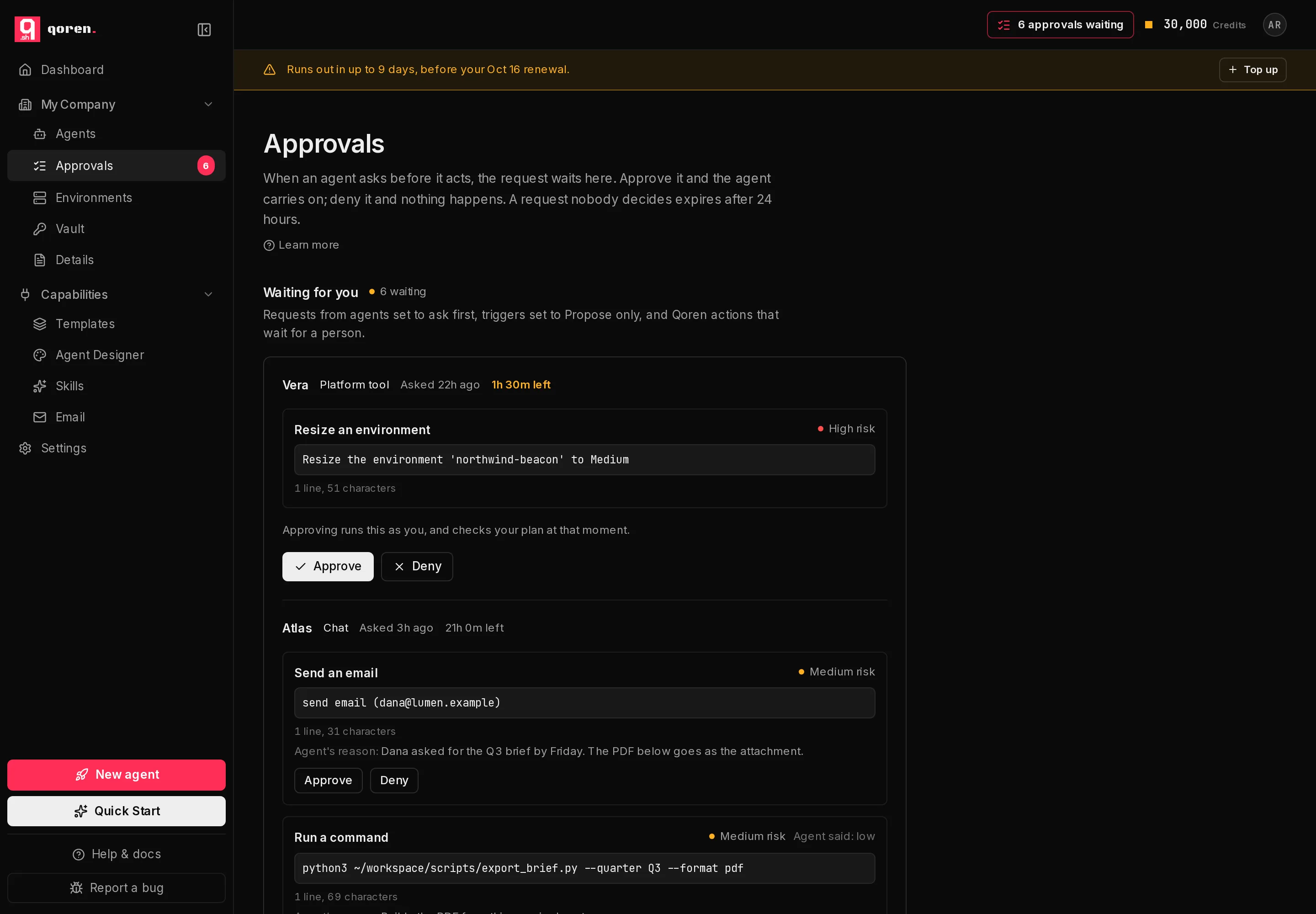
In the sidebar, under My Company, click Approvals (1). The number beside it is how many actions are waiting across all your agents. While anything is waiting, the top bar on every page also shows how many (2); click it to open the same page.
 12
12Waiting for you lists every request, the one closest to expiring first. Each one shows:
- The agent that asked, which opens that agent when you click it.
- Where it came from (1).
- When it was asked, and the time left before it expires (2). The time turns amber in the last two hours.
- What it wants to do: a short title such as Send an email or Run a command, the exact detail underneath with its line and character count, and the agent's reason when it gave one, marked Agent's reason.
- How risky it is. Qoren checks what the agent proposed and never rates it lower than its own check does, so the risk shown can be higher than the agent's own estimate. When they differ, the agent's label appears beside it, for example Agent said: low. Platform tools are always High risk.
 12345
12345Requests from connected tools#
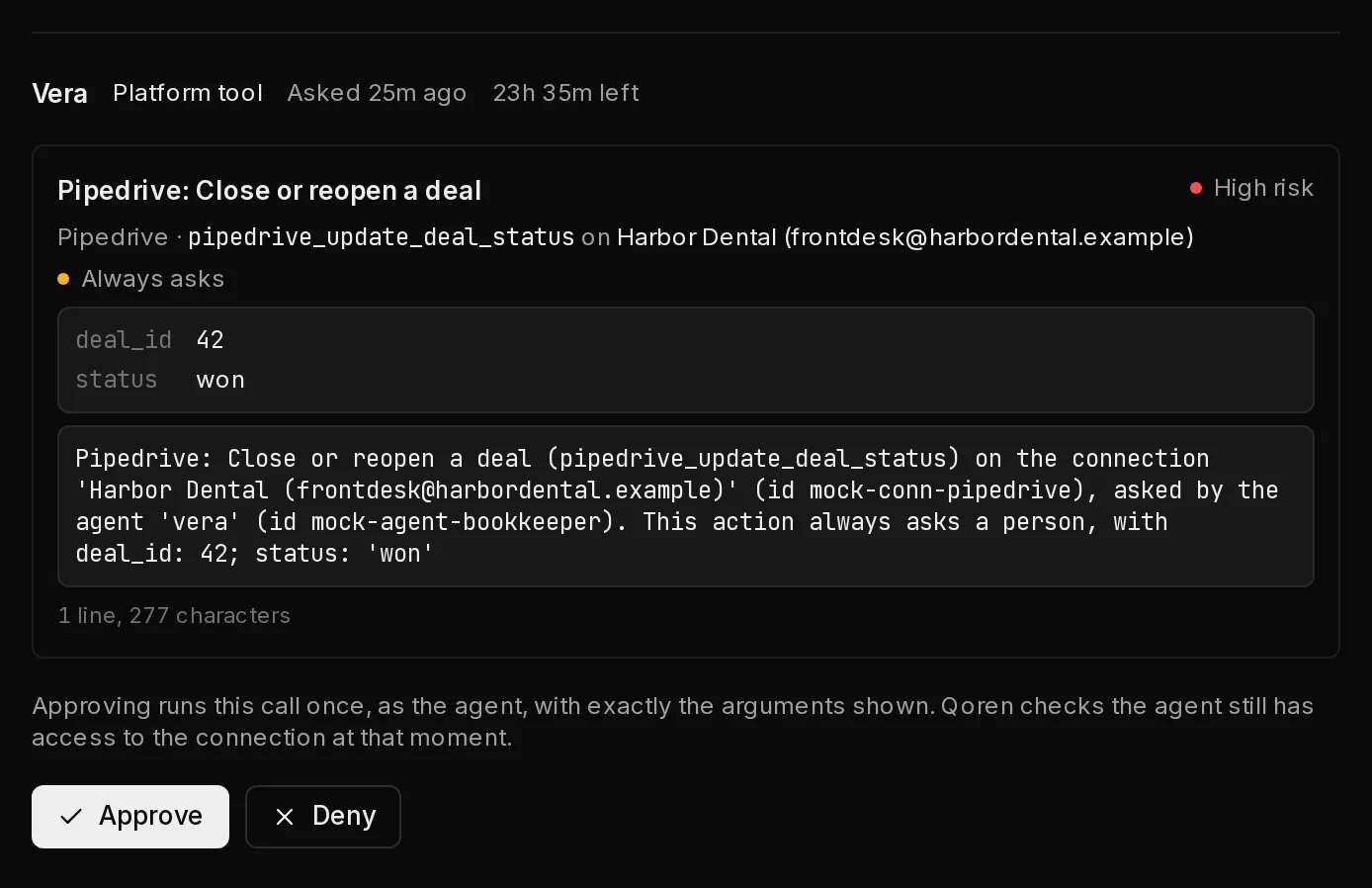
A request from a connected tool is titled with the tool and the action, such as Pipedrive: Close or reopen a deal. Under the title it names the tool and the connection it acts on, and Always asks (1) when the action always waits for a person. Below that, every argument that will run (2), in full, such as the deal and the new status. Hidden characters in an argument are shown the same way as in a command.
 12
12A trigger an agent asked for itself appears as Let the agent add a trigger. You can also approve or deny it on the agent's Triggers tab; see triggers an agent asks for.
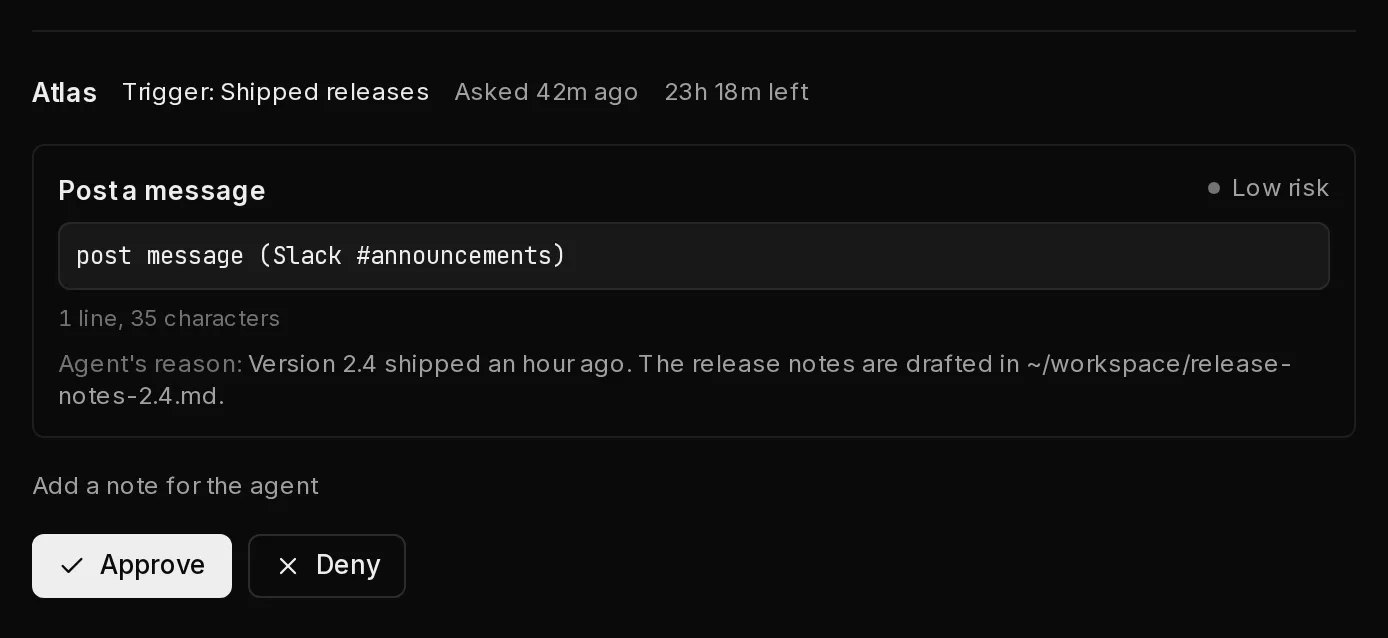
Approve or deny a request#
- Read what the agent wants to do. A command taller than its box must be read to the end first: scroll to its last line or click Show all, and Approve turns on.
- Click Approve (3) to let it go ahead, or Deny (4) to stop it.
- To tell the agent why you said no, click Add a note for the agent (5) before you click Deny. The note goes to the agent with the denial, so it can do something else instead.
What happens next depends on where the request came from:
- A trigger, chat or self-repair proposal: the agent picks the conversation back up with your decision, runs what you approved and skips what you denied. If it then needs to do more that changes state, it asks again.
- A connected tool: approving runs exactly the call you saw, once, as the agent. Qoren checks the agent's access again at that moment, so a call is refused if you have lowered the agent's level or removed its access since. Approving a trigger the agent asked for sets up the trigger; denying deletes the request.
- A platform tool: approving runs the action as you, and your plan is checked at that moment, not when the agent asked. Deleting a proposal or a lead, or archiving a client, also needs your own Delete permission for it (see team members); without it, approving is refused. Denying just closes the request.
A banner under the page title confirms the decision, and the request moves to Recently decided.
Only the owner of your Qoren organization can approve or deny. Other members see every request, but its buttons are greyed out with Only an org owner can approve or deny requests.
Before your decision is sent, Qoren checks the request again. If someone else decided it in the meantime, it expired, or what it would do changed, nothing is sent and the request shows its current version so you can look again.
What keeps an approval honest#
- Hidden characters are shown. Characters that would otherwise be invisible, or that reorder the text around them, appear as their code, such as ⟨U+202E⟩, with a warning beside the command. Treat a request that has them with care.
- A command too long to show in full cannot be approved. It reads Too long to review, and only Deny is offered. Ask the agent for something shorter.
- Only what you saw is decided. If more actions arrive while a request is open, or one changes, they are listed under the buttons as New or Changed since you saw it and are left out of your decision. Click Add it to this review to bring them in, undecided.
When an agent proposes several actions at once#
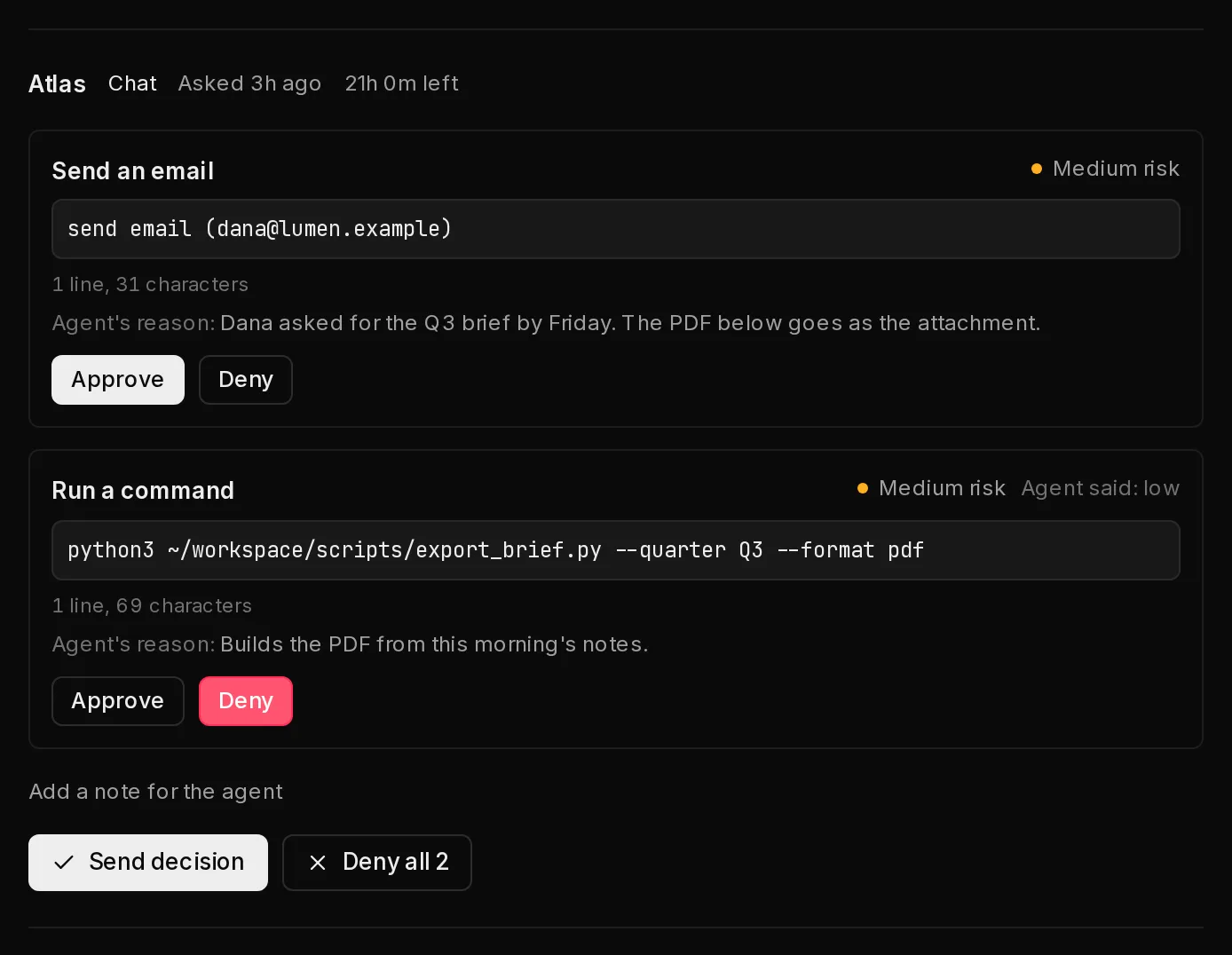
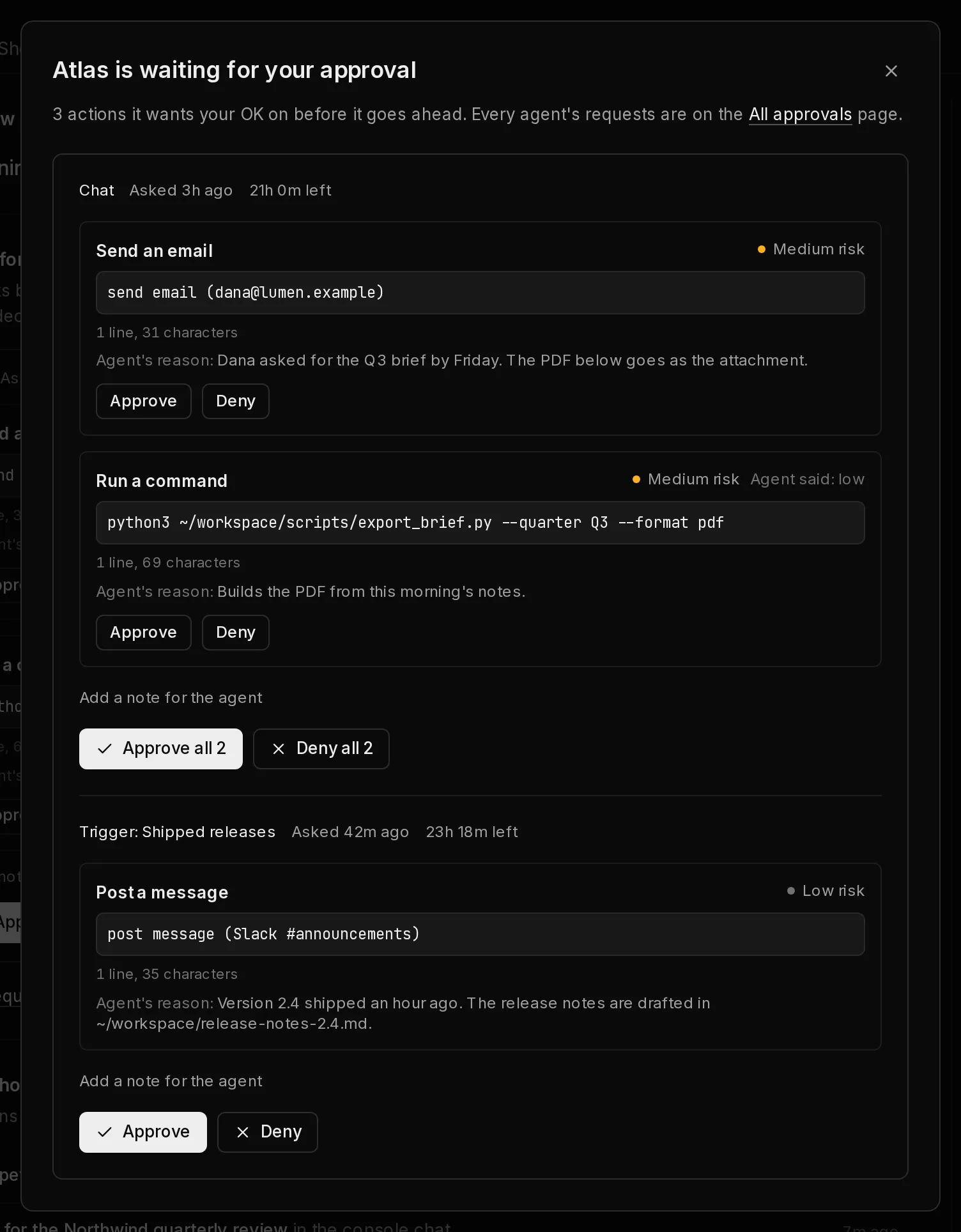
An agent in one turn can propose more than one action, for example an email and the command that builds its attachment. They arrive as one request with an Approve and Deny choice on each action (1). Nothing starts approved. Approve all approves every action shown, and Deny all turns the whole request down. To decide them one by one, choose Approve or Deny on each and click Send decision (2). The agent then resumes once with every decision.
 12
12Decide from the agent's page#
When an agent is waiting on you, a badge next to its status at the top of its page says how many approvals are waiting (1). It shows whichever tab you have open.
 1
1Click the badge to open that agent's requests, with the same buttons as the Approvals page. When you have decided the last one, the badge goes away. All approvals (1) opens the full page.
 1
1Review past decisions#
Recently decided, under the waiting requests, lists what was approved, denied or left to expire, newest first, with the agent, where each came from, when it was settled and any note left with a denial.
A request the agent's own settings approved, because its Approve automatically is set to Everything except high risk, is marked Approved automatically and reads Approved automatically by this agent's settings., with a link to change what that agent approves on its own.
Get told when something is waiting#
When a new request arrives, the owner of your Qoren organization gets an email naming the agent and what it wants to do, with a link to the Approvals page. To keep a burst of requests from filling your inbox, Qoren sends at most one of these an hour. Everything that arrives in between is on the page.
Frequently asked questions#
Who can approve a request?
The owner of your Qoren organization. Other members can see what is waiting but cannot approve or deny it. If a request is decided twice, the first decision counts and the second changes nothing.
What happens to a request nobody decides?
It expires 24 hours after it was made and can no longer be approved. It shows as Expired under Recently decided. The agent is not told again; if the work still matters, ask it in chat.
Does approving cost anything?
Approving a proposal starts a new turn for the agent, which uses credits like any other turn. Denying does not. An approved platform tool action costs whatever that action costs, for example a larger environment after a resize.
Can an agent approve its own request?
No. A person decides, from the console or the CLI. The one exception is a rule you set: with Approve automatically set to Everything except high risk, the agent's settings approve what it proposes unless it is high risk. That never covers Qoren tool requests, requests from a Custom agent, or the actions that always ask.
Is asking first a hard block?
Not entirely. For the work it covers, Qoren tells the agent to propose instead of act and keeps it from running risky commands on its own, and this page only ever shows what it actually proposed. A Qoren action set to Ask first is held by Qoren itself until someone decides. For hard limits, also narrow the Qoren tools it may call and give it only the keys it needs. Tools tagged Asks for approval always wait, whatever the autonomy.
What if an agent that asks first runs on its own?
A trigger, a scheduled task or a self-repair that proposes something waits here like any other request. Nobody is watching an unattended run, so set those rows to Act freely for an agent that should act on its own, turn on Approve automatically for what is not high risk, or keep an eye on this page.
Why did a request disappear before I decided?
Someone else in your organization decided it, or it reached its 24 hours and expired. Either way it is listed under Recently decided.